

बिबरन
PixLedger sends your store’s tracking events to Meta Pixel (Facebook), Google Analytics 4 and Google Tag Manager, and keeps a local log so you can see exactly what happened to every event.
Why PixLedger
- One place for three platforms. Add your Meta Pixel, GA4 and GTM IDs, switch each platform on, and choose which events to track.
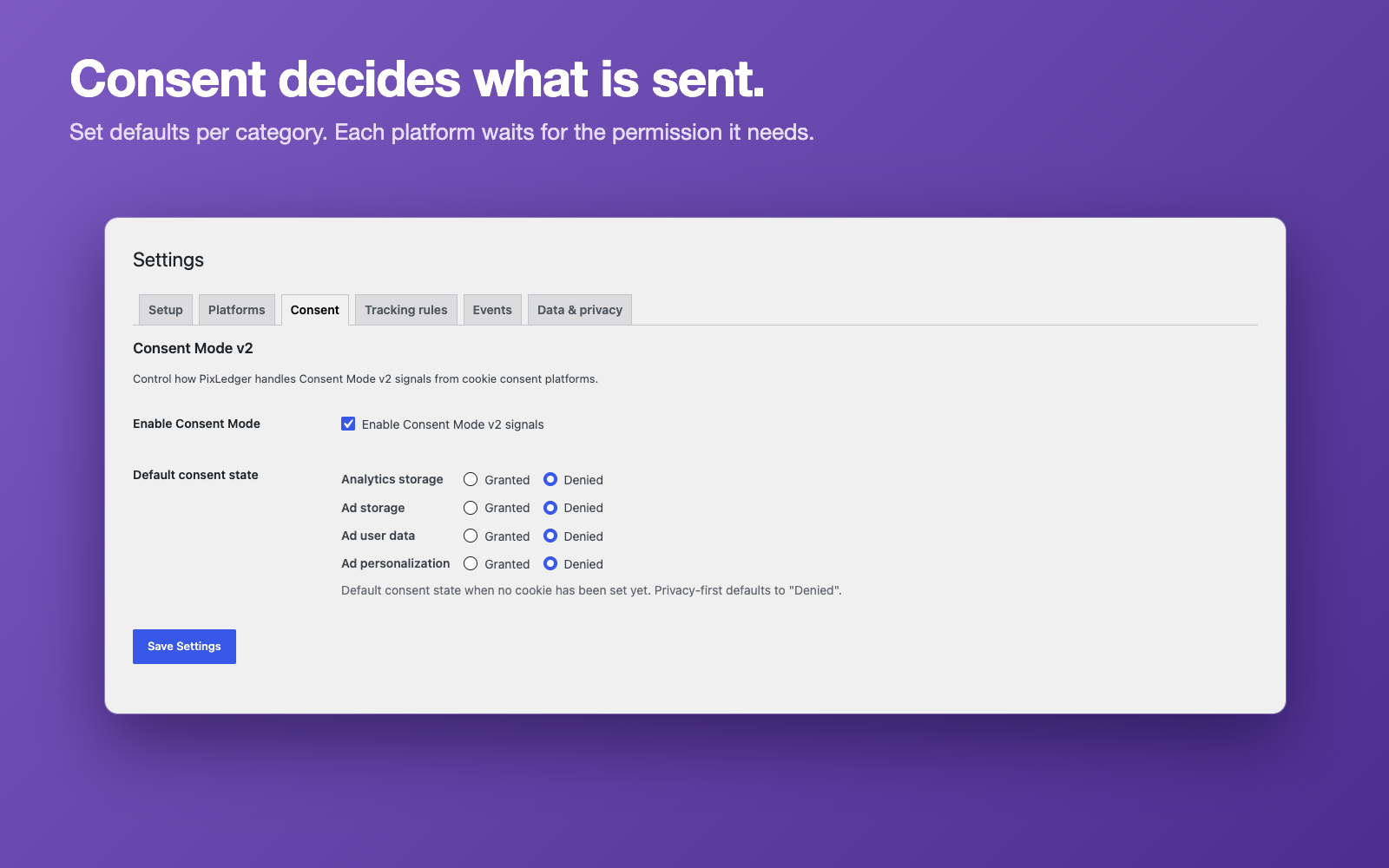
- Consent comes first. Events wait for the visitor’s permission. Meta, GA4 and GTM each need the consent that fits them, and PixLedger works with the WP Consent API, Complianz or your own banner.
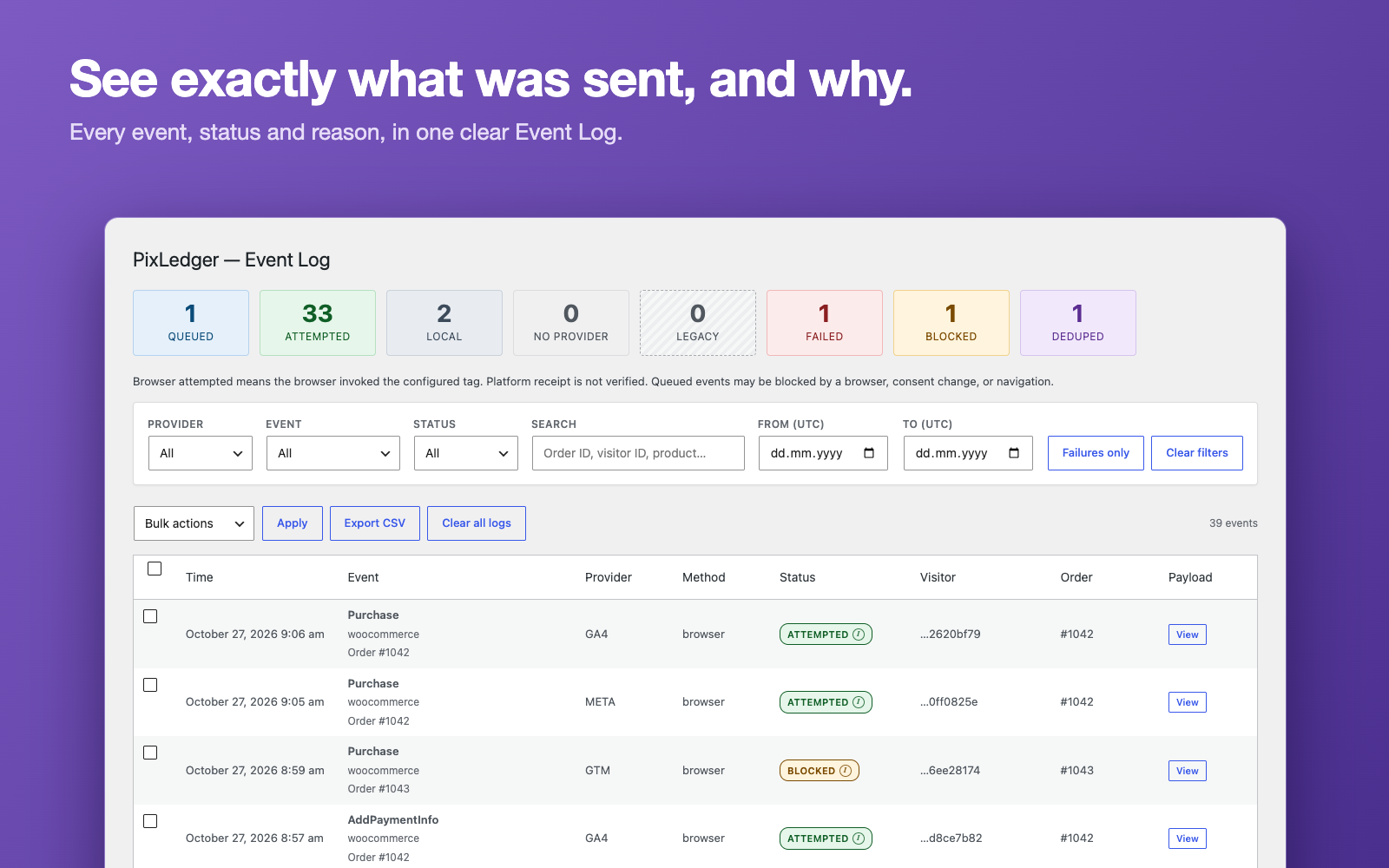
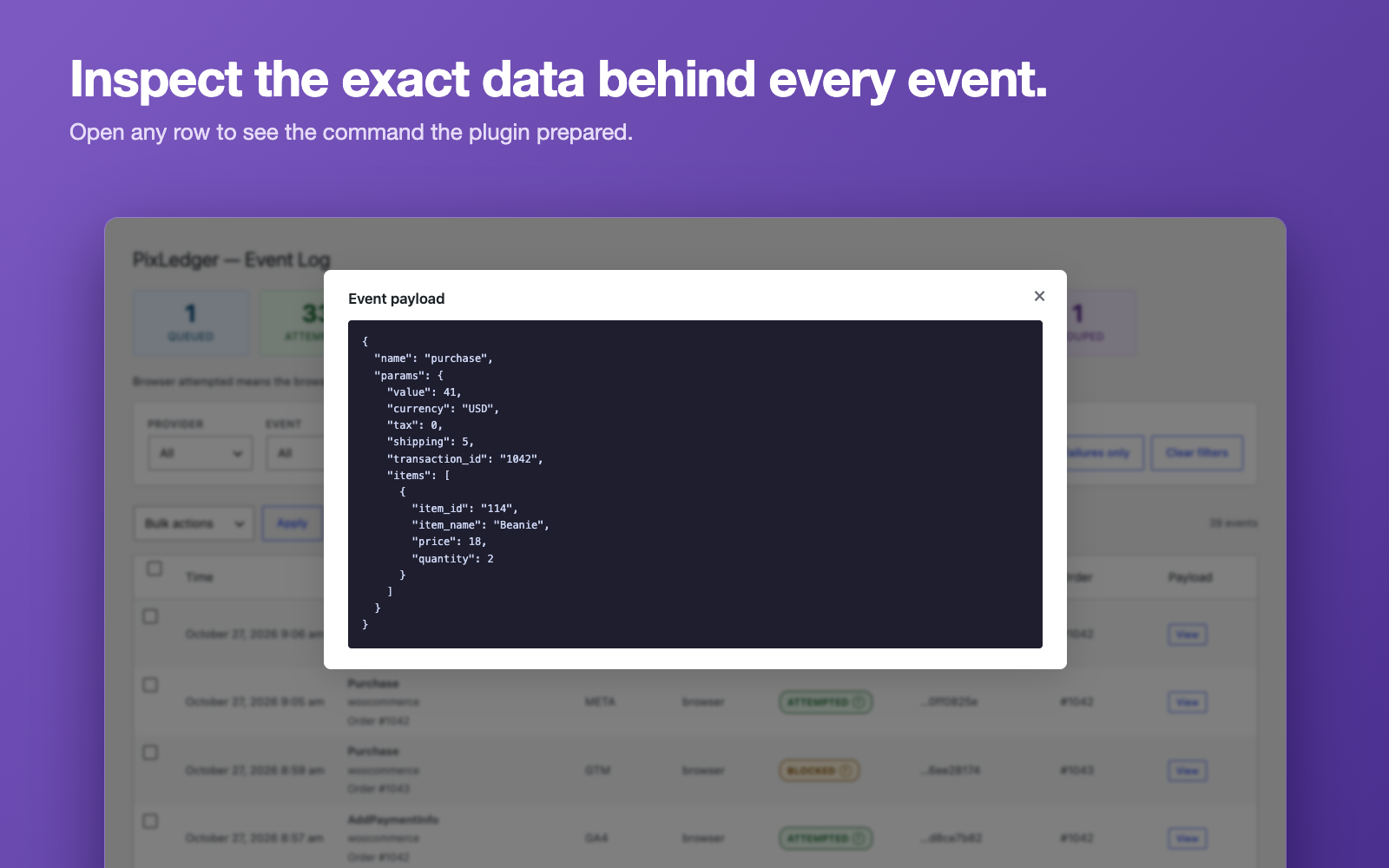
- See what really happened. The Event Log shows every event with its status, the reason when something was blocked or skipped, and the exact payload that was prepared.
- Built for WooCommerce, works without it. Product views, cart, checkout, payment and shipping steps, coupons and purchases come from your real orders, and a purchase is only tracked when WooCommerce considers the order paid. Without WooCommerce, page, click, form, search and custom events still work.
- Privacy-minded. Form values and email addresses are not collected, tracked links lose their query strings, and personal data export and erase tools are included.
- Free, with nothing locked. Every feature in this plugin works without a licence or subscription.
What it does not do. PixLedger sends events from the visitor’s browser. It cannot deliver an event after the browser has closed, and it cannot prove that a platform accepted an event. Server-side delivery is not part of this plugin.
How it works
PixLedger Lite connects your site to Meta Pixel, Google Analytics 4 and Google Tag Manager. WooCommerce events use data from WooCommerce; browsing events come from the visitor’s browser. A local event log shows the mapped provider payload and how far each event progressed.
What the event log means
- Queued: a provider command has been prepared for a browser response.
- Browser attempted (shown as “Attempted”): the browser reported invoking the provider API. This does not confirm platform receipt, attribution or reporting.
- Recorded locally (shown as “Local”): a diagnostic event, including an administrative refund or a page-exit event waiting for another page visit.
- Blocked (by consent): a provider’s consent requirements were not met. Blocked records contain minimal diagnostic data.
- No provider: there was no enabled provider with a valid ID.
- Failed: preparation failed. A tag blocked by the browser remains queued.
- Deduplicated (shown as “Deduped”): intentionally skipped, such as ecommerce data already managed by GTM4WP.
- Legacy sent (unverified) (shown as “Legacy”): an older log entry whose delivery was not verified.
Each status is explained below the Event Log table. Filter logs by event, provider, status, UTC date range or order/visitor/event ID. Inspect payloads, export the filtered log as CSV (up to 100,000 rows per file), delete selected logs and configure retention. CSV exports contain visitor IDs and event payloads, which are pseudonymous personal data, so handle downloaded files accordingly; customer email is never exported. WordPress displays event times in your site’s timezone.
Tracking
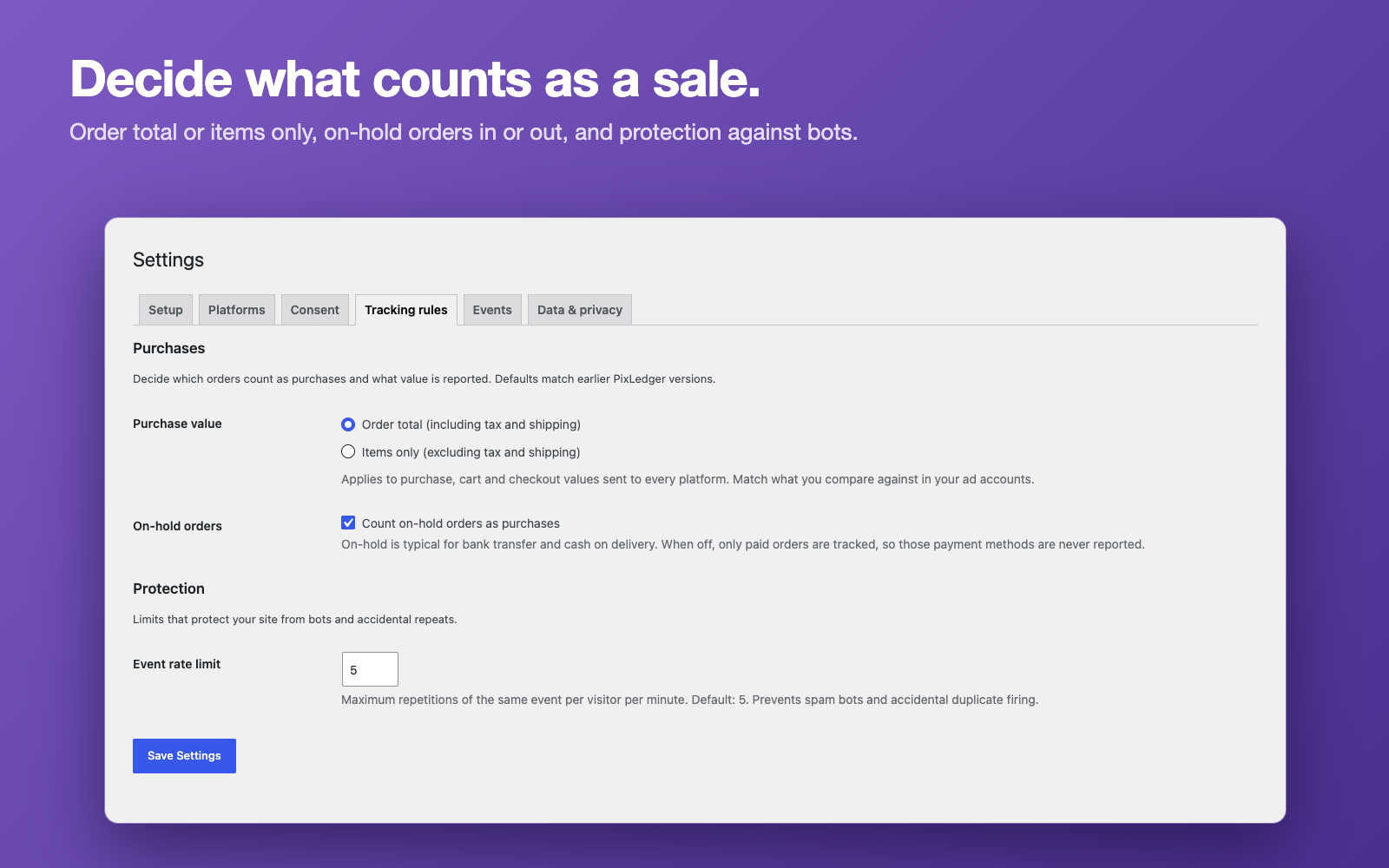
WooCommerce: product views, cart additions/removals, cart and checkout views, payment/shipping selection at order processing, coupons, purchases and product-review submissions. Purchase requires an order WooCommerce considers paid and a valid recent order key or checkout delivery cookie. Pending, failed and cancelled orders never produce Purchase events. On-hold orders (typical for bank transfer and cash on delivery) are counted by default; switch that off under Tracking rules to count paid orders only. Payment completed after the visitor leaves may not reach browser platforms.
Refunds are recorded locally. Lite does not send administrative background refunds to external platforms.
WordPress/browser: page views, 404 pages, outbound/download/phone/email clicks, search, form submission attempts, abandoned forms, scroll depth, time on page, account actions and comments. HTML5 video start/end events are supported; embedded YouTube/Vimeo players are not integrated. FormSubmit means an attempted submission, not a confirmed lead.
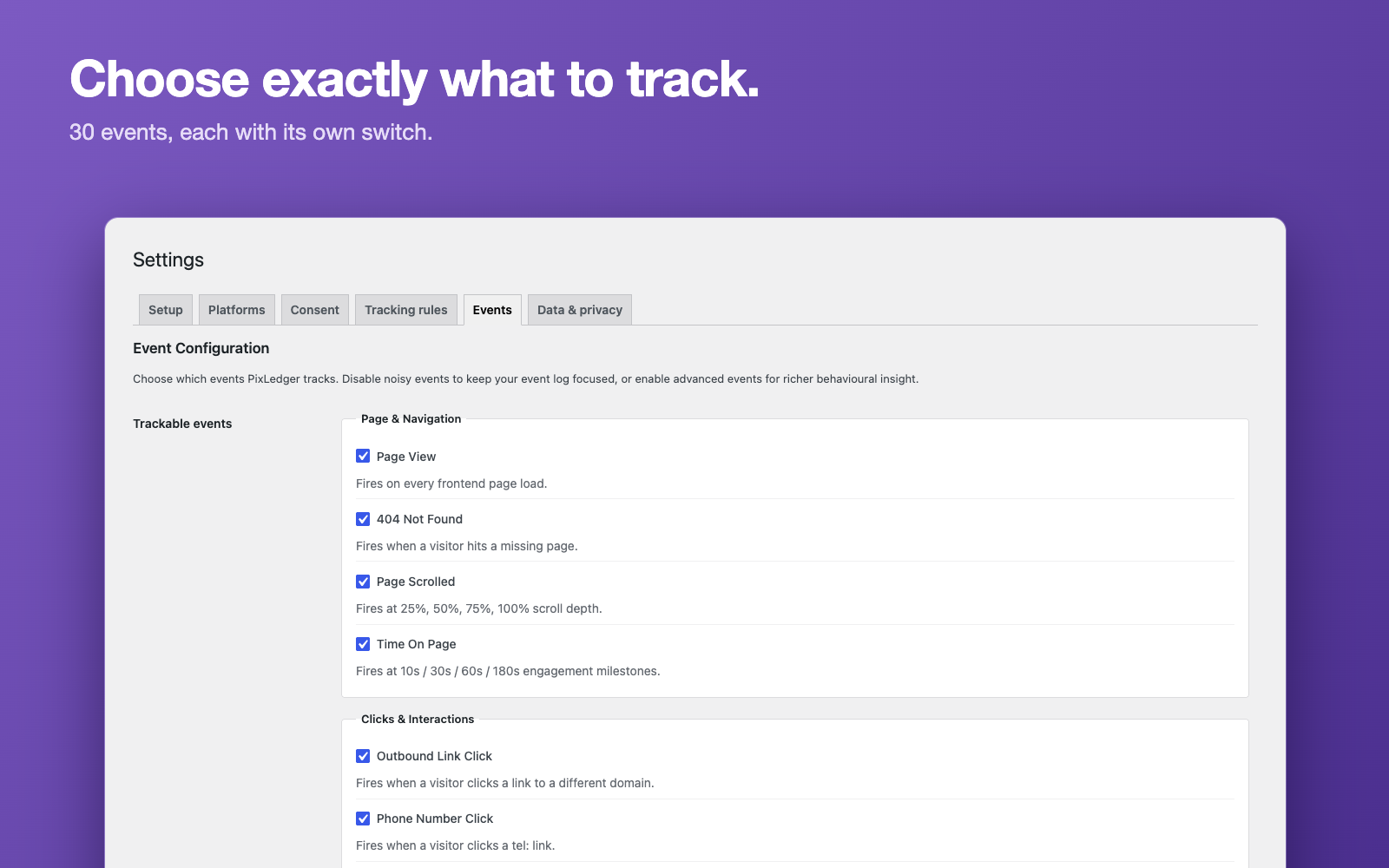
Each event has a switch. The Custom Events switch also controls unregistered custom event names. Features are available without a subscription or license key. WooCommerce is optional.
Custom events
Use pixledger('track', 'DemoAction', { value: 12 }) after the pixledger_ready document event (or when pixledger.ready is true), or add data-pixledger-event="DemoAction" to an element. Optional data-pixledger-data and data-pixledger-context attributes accept JSON. The pxl and data-pxl-event aliases remain supported. The browser API cannot emit reserved purchase, cart or account events.
Custom events must not contain personal information. Payloads are bounded and sensitive field names are removed. Form field values, telephone numbers and email link destinations are never read. Explicit page/link URL properties omit query strings and fragments.
Consent and privacy
New installations enforce consent by default, with all categories denied. An existing explicit choice to disable Consent Mode is preserved. PixLedger is not a cookie banner: connect WP Consent API, Complianz or your own consent interface. Custom integrations can call pixledger('consent', { analytics_storage: true, ad_storage: false, ad_user_data: false, ad_personalization: false }) with the full current choice.
GA4 requires analytics consent. Meta requires ad storage and ad user data consent. GTM requires both analytics and marketing consent because containers can contain arbitrary tags. Consent changes apply on the current page. PixLedger uses basic consent gating; it does not send denied-consent cookieless measurement pings. Disabling Consent Mode bypasses these gates and is a deliberate administrator choice.
Before consent permits collection, PixLedger does not create a visitor ID, persist browsing events or load its provider libraries. Revocation clears PixLedger’s browser buffer, identity/attribution cookies and pending queue. Previously stored event logs are managed by retention and privacy tools. Other plugins and tags have their own consent behaviour.
Visitor IDs are pseudonymous, not anonymous. Cookies last up to 90 days (visitor), 30 days (attribution), or one day (transport and order delivery). First-touch campaign attribution uses paid-click overrides; click IDs require marketing consent. Attribution is attached to an order at checkout, including pending orders, and is not proof of a paid conversion.
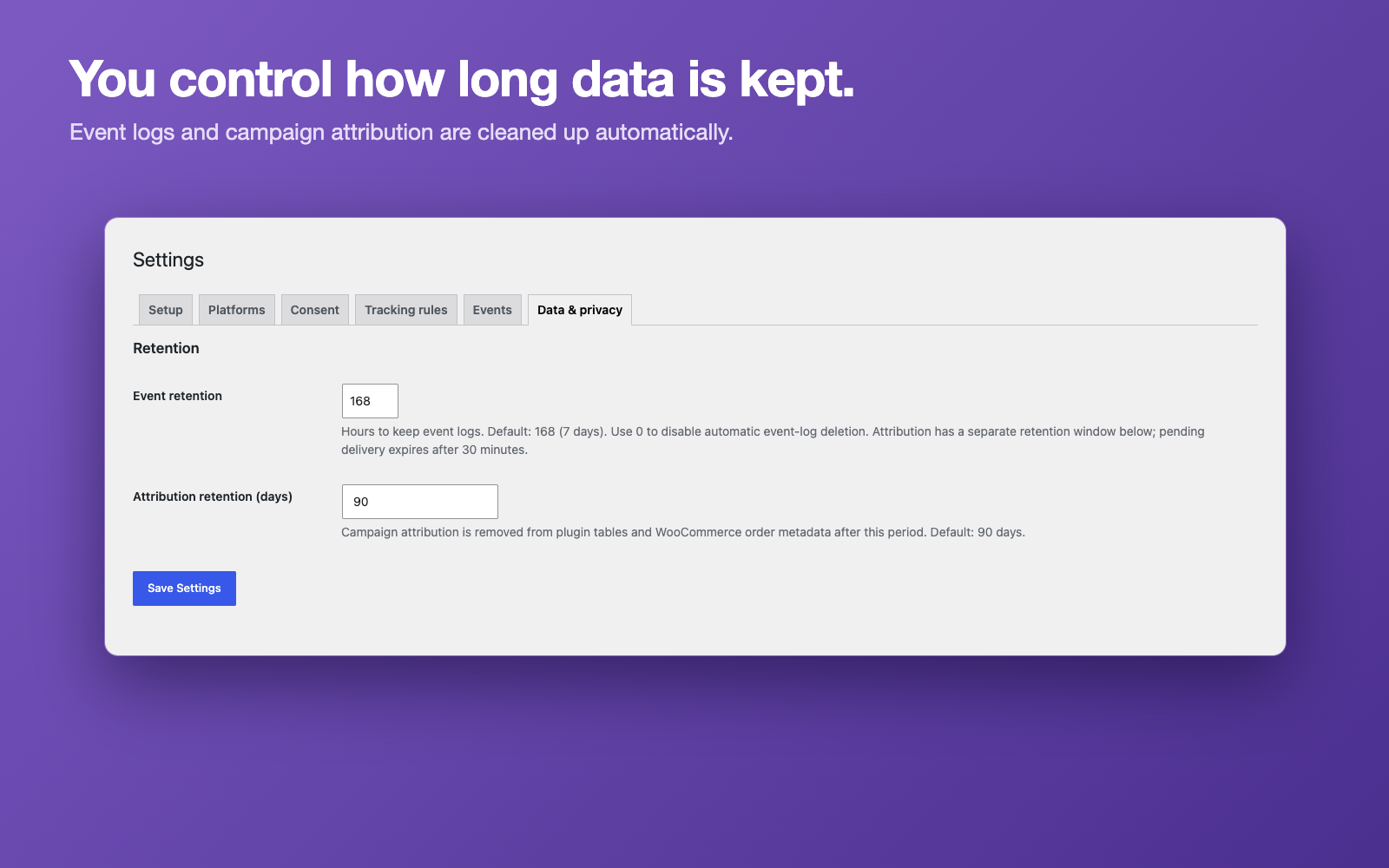
Event logs default to 168 hours; 0 disables event-log cleanup. Attribution defaults to 90 days and is removed from both the plugin table and related order metadata. Pending delivery expires after 30 minutes. Scheduled cleanup is bounded and runs with WP-Cron; actual deletion depends on cron execution. Configure reliable cron for predictable retention.
WordPress Tools > Export Personal Data / Erase Personal Data supports order-linked PixLedger records and legacy email-linked logs. Browsing data with no email/order link cannot be identified from an email request. New event records do not store customer email hashes. A purchase replay marker can remain on an erased order to prevent resending its conversion.
Delivery, caching and integrations
Cacheable HTML contains configuration and page descriptors, not visitor-specific event queues. The browser obtains a fresh nonce/settings response and retrieves its server-owned pending events through same-origin AJAX. Allow PixLedger requests through your cache/security layer; do not cache admin-ajax.php POST responses.
Network failures use bounded retries. Events saved during navigation may be delivered on the next consenting page within 30 minutes. The visitor must return to a page where PixLedger runs; Lite cannot guarantee last-page delivery or exact-once external delivery.
Plugin detection warns of possible overlap. Runtime checks avoid loading the same library URL again; they cannot prevent another plugin or GTM container from firing its own events. Use one owner per destination/event. In particular, do not send direct GA4 events and equivalent GTM tags to the same property. GA4 automatic page views are disabled for PixLedger’s own configuration.
By default, purchase, cart and checkout values are the order total including tax and shipping (tax and shipping are also sent as separate fields). Under Tracking rules you can switch to items only, excluding tax and shipping, to match what you compare against in your ad accounts. Variation IDs identify variants. GTM receives GA4-style ecommerce objects. Configure your GTM tags to read them; pushing a dataLayer event does not itself send a conversion.
Scope
Server API delivery, platform reconciliation and advanced attribution reporting are outside Lite. Two paid upgrades, PixLedger Pro and PixLedger Insights, are under development; the free plugin does not depend on them and nothing in it is locked or limited to push you toward them. This version makes no platform delivery or legal-compliance guarantee. Network activation on WordPress multisite is not supported; activate and manage the plugin per site.
External Services
Enabled providers load third-party JavaScript only when their consent conditions allow it. Those libraries can collect browser/device information and transmit data to the provider. PixLedger supplies event names, page context and relevant product/order values. It does not configure email advanced matching. Review settings in each provider as well as in your consent platform.
- Meta Pixel: loads from connect.facebook.net and sends events to Meta. Privacy | Terms
- Google Analytics 4: loads gtag.js from googletagmanager.com and sends events to Google Analytics. Privacy | Terms
- Google Tag Manager: loads gtm.js from googletagmanager.com and pushes mapped events to dataLayer. The site’s container controls additional services. Privacy | Terms
Screenshots

Installation
- Back up the database and current plugin first, and try the update on a staging site if you can.
- Install the packaged pixledger ZIP and activate it for the individual site.
- Enter your chosen provider IDs in PixLedger > Settings and enable only those providers.
- Connect your consent interface, choose events, and set retention periods.
- Test denied/granted/revoked consent, cart actions and a paid test order. Compare the local log with the provider’s own testing tools.
- Remove duplicate tracking from other plugins and GTM tags before production use.
FAQ
-
Does browser attempted mean a platform received the event?
-
No. It confirms the browser reported calling the configured tag. Browser blockers, network failures and provider processing can still prevent receipt. Check the platform’s own tools.
-
Can Lite send conversions after the browser closes?
-
No. Server API delivery is outside Lite. A queued observation can be retried on the next consenting page within its expiry window.
-
Does it work without WooCommerce?
-
Yes. Page views, clicks, forms, search, account actions, comments and custom events work on any WordPress site. WooCommerce events are added automatically when WooCommerce is active.
-
Which consent tools does it work with?
-
The WP Consent API and Complianz are read directly. Any other banner can pass the visitor’s choice with
pixledger('consent', { analytics_storage: true, ad_storage: true, ad_user_data: true, ad_personalization: true }). -
Is there a paid version?
-
Everything in this plugin is free and nothing is locked. Two paid upgrades, PixLedger Pro and PixLedger Insights, are under development; you do not need them to use this plugin.
-
What happens on upgrade?
-
Existing configuration and logs are preserved. Legacy unsigned pending/visitor/attribution cookies are not trusted and are replaced after consent. Legacy purchase markers prevent old conversions from replaying. Historical sent statuses remain labelled unverified. New tables/indexes are added automatically.
-
What happens on deletion?
-
Deactivation keeps data. Deleting the plugin removes its tables, options, scheduled jobs and PixLedger order metadata for the current site. Back up data before deletion.
समीक्षा
There are no reviews for this plugin.
Contributors & Developers
“PixLedger – Consent-Aware Meta Pixel, GA4 & GTM Tracking for WooCommerce” is open source software. The following people have contributed to this plugin.
Contributors
Interested in development?
Browse the code, check out the SVN repository, or subscribe to the development log by RSS.
Changelog
1.8.4
- Fixed: when consent was widened (for example marketing allowed after analytics) while a tracking request was still running, product, cart and checkout events were not delivered to the newly allowed providers. They now are.
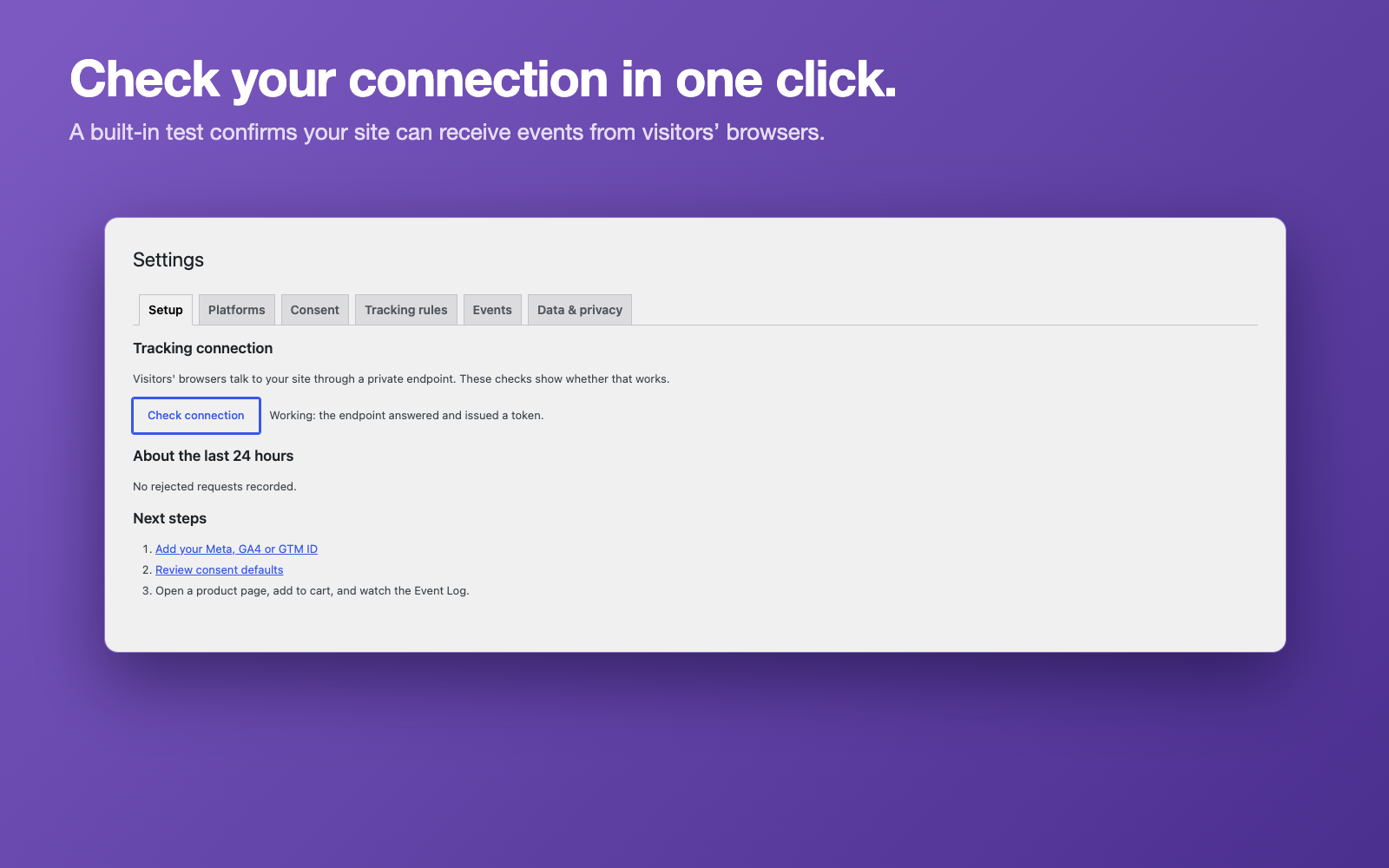
- Changed: the Setup tab heading reads “About the last 24 hours”.
1.8.3
- Fixed: withdrawing consent while a tracking request is still running now clears the visitor’s stored state straight afterwards instead of at the next page load.
- Fixed: advertising click IDs (such as gclid) are no longer saved to new orders, or kept in the stored attribution, after marketing consent is withdrawn.
- Fixed: product, cart and checkout events are requested again when a provider script failed to load, and are delivered to providers that receive consent later on the same page.
- Fixed: order, cart and item amounts keep the store’s price precision, so three-decimal currencies such as KWD are no longer cut to cents.
- Fixed: the personal data export includes orders that only have pending PixLedger events.
- Fixed: “Last 24 hours” on the Setup tab is a rolling window and no longer keeps old entries.
- Changed: the Export CSV button states its row limit, and the recorded plugin version is updated with every plugin update.
1.8.2
- Added: Export CSV in the Event Log. It downloads every event matching the current filters; customer email is never included and spreadsheet formulas are neutralised.
- Changed: the Event Log status column and tiles use short labels (Queued, Attempted, Local, No provider, Legacy, Failed, Blocked, Deduped), a legend below the table explains each status, and every status now has its own colour. Legacy entries are no longer shown in green.
- Changed: the Roadmap page is now “Pro & Insights”, a short information page about two planned upgrades that are under development. Nothing in the free plugin is locked.
- Fixed: a missing translators comment, and the translation template is up to date.
1.8.1
- Replaced HTML provider queues with a consent-aware uncached browser transport and server-owned pending events.
- Added signed first-party state, reserved-event protection, request limits and paid-order checks.
- Added explicit queued/browser-attempted/local states, stable event IDs and signed browser acknowledgements.
- Fixed event switches, custom API aliases, GA4/GTM mapping and commerce item values.
- Added privacy export/erasure, attribution retention, date filters and accurate deletion counts.
- Added integration/browser regressions, a reproducible release builder and CI.
- Clarified browser delivery limits and removed unsupported Lite/Pro claims.
- Settings are now organised in tabs (Setup, Platforms, Consent, Tracking rules, Events, Data & privacy), with a connection self-check and a 24-hour summary of rejected requests on the Setup tab.
- Added Tracking rules: report purchase value as order total or items only, and choose whether on-hold orders count as purchases.
- Request limits now work behind proxies and CDNs when the proxy headers are trusted (filters
pixledger_trust_proxy_headersandpixledger_request_limit_per_minute). - A tag ID already running on the page from another plugin or tag is no longer started or fed twice; the event log records the skip.
- Purchase can be delivered from custom thank-you pages through a short-lived, order-bound cookie.
- Fixed: page views without a referrer reported the page itself as
page_referrer; videos without a source reported the page URL asvideo_src. - Fixed: a stray empty entry in the order’s browser-attempt record.
- Changed: the GA4 name of the 404 event is now
not_foundinstead ofnot_found404.
1.8.0
Consent
- Fixed: Events were logged as “Blocked” even after the visitor accepted cookies in Complianz. Consent is now read from the WP Consent API (when a banner is registered with it) and directly from Complianz’s own cookies
- Fixed: The WP Consent API is ignored when no banner plugin has registered with it, instead of treating every category as granted
- Fixed: Meta Pixel is no longer loaded, and no Meta events are sent, before the visitor gives marketing consent. It starts on the same page as soon as consent is given, and stops if consent is withdrawn
- Fixed: The Google Consent Mode default is now built from your settings only, and the visitor’s real choice is applied in the browser — safe with full-page caching
- Added: Consent changes made on the same page (WP Consent API / Complianz) are forwarded to Google Consent Mode without a reload
Tracking
- Fixed: Page views were counted twice in GA4 and Meta when the PageView event was enabled. When PixLedger loads the pixel itself, the pixel’s automatic page view is now skipped because PixLedger sends its own
- Fixed: Browser-side events (phone and email clicks, scroll depth, custom data-pxl-event and pxl(‘track’) events, and clicks or form submits that keep the visitor on the page) were logged but never delivered to GA4, GTM or Meta. They are now fired in the browser when consent allows. Events from clicks or form submits that navigate away are still logged, but may not reach the providers
- Fixed: Purchase no longer depends on the thank-you page template. It is sent on the order confirmation page whatever builds it (default template, block confirmation, Elementor or other custom templates), and on custom thank-you pages outside WooCommerce’s endpoint — including plugins that redirect away from the thank-you URL
- Fixed: Background requests that make WordPress render a page (scripts calling the server, missing images or files) were logged as page views and 404s, and could use up a pending event before the real page loaded. Only real page loads now count
- Fixed: Purchase was reported for failed payments, because WooCommerce runs its thank-you hook for those too. Failed and cancelled orders are never reported
- Fixed: AddPaymentInfo and AddShippingInfo did not fire with the WooCommerce block checkout, and were only logged (never sent to the providers) with the classic checkout. Both are now sent with the order confirmation, once per order
- Fixed: With GTM4WP’s WooCommerce tracking enabled, ecommerce events (view_item, add_to_cart, begin_checkout, purchase, …) were pushed to the dataLayer twice. PixLedger now skips its own push for those and logs them as “Deduped” with the reason
- Changed: Meta Pixel events that are not Meta standard events (including RemoveFromCart) are now sent with trackCustom
Caching
- Fixed: Pages carrying a visitor’s own events (add to cart, coupon, checkout) are excluded from full-page caches so they are not replayed to other visitors
- Fixed: On pages served from a full-page cache, Meta event IDs are made unique per visitor so Meta does not merge different visitors’ events
Security
- Hardened: all data written into PixLedger’s inline script is encoded so that no value (product names, order data, filter output) can break out of the script element
Housekeeping
- Fixed: The Event Log now honours the configured retention window by default
- Fixed: Uninstall now also removes per-event settings and rate-limit transients
- Added: Database schema upgrades now run automatically after a plugin update (tracked in pixledger_schema_version)
- Fixed: Readme referenced outdated table names and visitor ID format
1.6.5
- Changed: Plugin display name updated to “PixLedger – WooCommerce Conversion Tracking for Meta, GA4 & GTM” for clarity in WordPress.org search results
- Changed: Tags updated to woocommerce tracking, meta pixel, ga4, google tag manager, consent mode
- Note: No functional or tracking behavior changes — this is a listing/metadata update only
1.6.4
- Changed: All plugin prefixes renamed from pxl_/PXL_ (3 chars) to pixledger_/PIXLEDGER_ (9 chars) to comply with WordPress.org prefix requirements
- Changed: Database tables renamed from wp_pxl_events/wp_pxl_attribution to wp_pxlg_events/wp_pxlg_attribution
- Changed: All hooks, options, AJAX actions, nonces, cookies, script handles, and JS globals now use pixledger_ prefix
- Changed: Removed is_pro event locking — all events in the registry (PageScrolled, TimeOnPage, FormAbandoned, UserLogout, VideoStart, VideoComplete) are now fully functional in Lite
- Changed: Removed disabled attribute and Pro badges from Event Configuration toggles — all events are now freely configurable
- Changed: Removed locked Visitor ID and Order ID UI from Event Log
- Added: PixLedger Pro informational submenu page — lists Pro features with link to pixledger.com (no functional code, no license checks)
- Note: No tracking behavior changes — this release is a compliance and housekeeping update
1.6.3
- Changed: Event retention is now fully unrestricted — no upper cap, configurable to any number of hours (default 168h / 7 days)
- Changed: Event Log display is no longer capped to a fixed window — shows events within the configured retention period
- Changed: Expanded inline sanitize_callback for event toggle settings to explicit static function block
- Removed: All references to Pro-only retention cap from code, comments, and documentation
1.6.2
- Added: External Services section in readme — documents Meta Pixel, GA4, and GTM connections with links to terms and privacy policies per WordPress.org guidelines
- Changed: Event retention is now configurable in Settings Advanced (1–720 hours / up to 30 days, default 7 days)
- Changed: Removed comparative marketing claims from plugin description per WordPress.org guidelines
- Note: PixLedger Pro retains unlimited retention (no upper cap, 0 = never delete)
1.6.1
- Fixed: All output now escaped per WordPress.org coding standards — inline provider queue JSON is emitted via wp_json_encode()
- Fixed: All user input ($_POST, $_COOKIE) sanitised and unslashed inline at the point of use
- Fixed: Database queries hardened — table names composed only from $wpdb->prefix, all parameters passed through $wpdb->prepare() with placeholders
- Changed: Removed deprecated load_plugin_textdomain() call — WordPress.org loads translations automatically since WordPress 4.6
- Changed: Prefixed all global variables in uninstall.php (pxl_ prefix)
- Changed: Trimmed readme tags to 5 per WordPress.org guidelines
- Added: phpcs.xml configuration declaring the pxl_ hook/function prefix
- Note: No functional changes — this release contains only WordPress.org Plugin Check compliance fixes
1.6.0
- Fixed: Duplicate GTM/GA4 events on add-to-cart and remove-from-cart — JS jQuery listener now checks PHP PendingEventStore queue before firing, preventing double dataLayer pushes after classic WooCommerce redirect
- Fixed: GTM dataLayer ecommerce key incorrectly set to [] (empty array) for non-ecommerce events (PageView, UserLogin, etc.) — ecommerce key is now omitted entirely when there is no ecommerce data
- Fixed: pxlConfig.detection returning empty arrays [] instead of {present, source} objects — TagDetector::detect_all() now returns proper object-shaped arrays so JS conflict detection works correctly and prevents double GTM/GA4 injection
-
Added: TagDetector::get_detected_names() method for Settings page to retrieve plugin display names per tag type
-
Added: EventRegistry — central catalogue of all trackable events with per-event enable/disable toggles
- Added: Event Configuration panel in Settings — enable or disable any event individually, grouped by category
- Added: WPCoreTracker — universal WordPress events (PageView, NotFound404, UserLogin, UserRegister, CommentPosted, SearchPerformed, SearchEmpty)
- Added: TrackEndpoint — AJAX endpoint for client-side events (OutboundLinkClick, PhoneClick, EmailClick, DownloadClick, FormSubmit)
- Added: Universal JS event listeners in tracker.js with event buffering and Beacon API flush on page unload
- Added: enabledEvents map passed to tracker.js so JS events are gated client-side before leaving the browser
- Added: RemoveFromCart, CartView, AddPaymentInfo, AddShippingInfo, CouponApplied, OrderRefunded, ProductReview WooCommerce events
- Changed: “Debug Console” renamed to “Event Log” in all user-facing strings
- Fixed: EventDispatcher now logs events with status ‘no_provider’ when no providers are configured, so Event Log always reflects what fired
1.5.0
- Added: Provider queue system for GA4, Meta Pixel, and GTM — all three providers now use a filter-based queue (pxl_ga4_queued_events, pxl_meta_queued_events, pxl_gtm_queued_events) that dispatches through the full EventDispatcher pipeline on the next page load
- Added: PendingEventStore — cookie-based serialized EventDTO queue for WooCommerce redirect events (AddToCart, RemoveFromCart, CouponApplied) that fire during POST 302 redirects where wp_footer never renders
- Added: ProductDataEndpoint — AJAX endpoint for fetching product data (price, name, currency) to support immediate event firing on AJAX cart operations (shop/category pages)
- Added: AJAX cart event listeners in tracker.js — added_to_cart and removed_from_cart jQuery events fire GA4/Meta/GTM events immediately for AJAX add-to-cart without page reload
- Fixed: WooCommerce redirect events (AddToCart, RemoveFromCart) not reaching GA4, Meta Pixel, or GTM providers due to POST 302 redirect preventing wp_footer from rendering
- Changed: Assets.php now outputs all three provider queues in a single wp_footer script tag at priority 1
1.4.0
- Added: GTM provider — push events to window.dataLayer in GA4 Enhanced Ecommerce schema with full items array
- Added: Tag detection — runtime checks for existing Meta Pixel (window.fbq), GA4 (window.gtag), and GTM (window.google_tag_manager); also detects common plugins (GTM4WP, Site Kit); skips injection to prevent duplicates
- Added: Detection notices in Settings — admin notices explain what was detected and which plugin is responsible
- Fixed: woocommerce_cart_item_removed hook passes WC_Cart object as second parameter — removed item now correctly read from $cart->removed_cart_contents[$cart_item_key]
1.3.0
- Added: Visitor ID system — anonymous 90-day cookie (pxl_visitor_id), visitor_id column in wp_pxl_events, get_or_create_visitor_id() in SessionService; attached to every EventDTO
- Added: Object context on every event — object_type, object_id, object_title fields on EventDTO; product/page name shown as subtitle under event name in Event Log
- Added: Reason text for blocked/failed events — EventBlockedByConsentException carries the specific consent category denied; EventDispatcher saves reason to response_data; shown as tooltip on status badge
- Added: Event Log pagination — 50 events per page, WordPress-style navigation, AJAX refresh respects current page
- Added: Filtering system — filter by provider, event name, status, delivery method, date range; combinable filters; instant AJAX application; Failures only quick-filter; active filter tags displayed
- Added: Bulk delete — row-level checkboxes with bulk action dropdown (WordPress standard pattern)
- Added: Clear all logs button with confirmation dialog
- Added: Visitor ID and Order ID columns in Event Log — visible but locked (Pro upsell teaser)
- Changed: Event retention increased from 48 hours to 7 days
- Changed: Rate limit now configurable in Settings (default 5 per minute, range 1–100)
1.2.0
- Added: EventRegistry — central catalogue of all trackable events with per-event enable/disable toggles saved to wp_options
- Added: EventDefinition DTO — immutable value object describing each event (name, category, label, description, default_enabled, is_pro)
- Added: Event Configuration panel in Settings — grouped toggles by category; Lite events active; Pro events visible but locked with Pro badge
- Added: WPCoreTracker — universal WordPress event tracking via PHP hooks (PageView, NotFound404, UserLogin, UserRegister, CommentPosted, SearchPerformed, SearchEmpty)
- Added: TrackEndpoint — AJAX endpoint (wp_ajax_pxl_track_batch) for client-side events with nonce verification, batch size cap, rate limiting, and input sanitisation
- Added: Universal JS event listeners in tracker.js — OutboundLinkClick, PhoneClick, EmailClick, DownloadClick, FormSubmit with event buffering and Beacon API flush on page unload
- Added: enabledEvents map passed to tracker.js so JS events are gated client-side before leaving the browser
- Added: RemoveFromCart, CartView, AddPaymentInfo, AddShippingInfo, CouponApplied, OrderRefunded, ProductReview WooCommerce events
- Added: no_provider status — EventDispatcher logs events with status ‘no_provider’ when no providers are configured
- Changed: Debug Console renamed to Event Log in all user-facing strings
- Changed: EventDispatcher now consults EventRegistry before dispatching — disabled events silently skipped
1.1.1
- Fixed: Fatal error on boot — removed invalid $session->register() call (SessionService has no register method)
- Fixed: Events not appearing in Event Log when no provider is configured — dispatcher now logs ‘no_provider’ status
1.1.0
- Added: GTM provider — push events to window.dataLayer in GA4 Enhanced Ecommerce schema
- Added: Tag detection — auto-detects existing Meta Pixel, GA4, and GTM installations, skips injection to prevent duplicates, shows admin notices in Settings
- Added: Visitor ID system — anonymous 90-day cookie, visitor_id column in wp_pxl_events
- Added: Object context on every event — object_type, object_id, object_title carried on every EventDTO
- Added: Reason text for blocked/failed events — shown as tooltip on status badge in Event Log
- Added: Pagination in Event Log — 50 events per page, AJAX refresh respects current page
- Added: Filtering system — filter by provider, event name, status, delivery method, date range
- Added: Bulk delete — row-level checkboxes with bulk action dropdown
- Added: Clear all logs button with confirmation dialog
- Added: Visitor ID and Order ID columns in Event Log (visible, locked for Pro)
- Changed: Lite retention increased from 48 hours to 7 days
- Changed: Rate limit now configurable in Settings (default 5 per minute, range 1–100)
- Fixed: Conditional WooCommerce loading — plugin now boots on any WordPress site, WooCommerce is an optional module
1.0.0
- Initial release
- Meta Pixel browser-side events (PageView, ViewContent, AddToCart, InitiateCheckout, Purchase)
- GA4 browser-side events with full ecommerce items array
- WooCommerce event tracking via PHP hooks
- Event Log with real-time AJAX auto-refresh and status badges
- Consent Mode v2 support with per-category defaults
- Attribution capture (UTM parameters, fbclid, gclid, ttclid, msclkid)
- Rate limiting to prevent spam bot flooding
- 7-day event retention with automated WP-Cron cleanup
- Full data removal on plugin deletion