
बिबरन
The plugin decides which VAT treatment each WooCommerce order gets, applies it through WooCommerce’s own tax calculation, and records the decision with its inputs on the order. It’s free, has no Pro version, and shows no branding in your store.
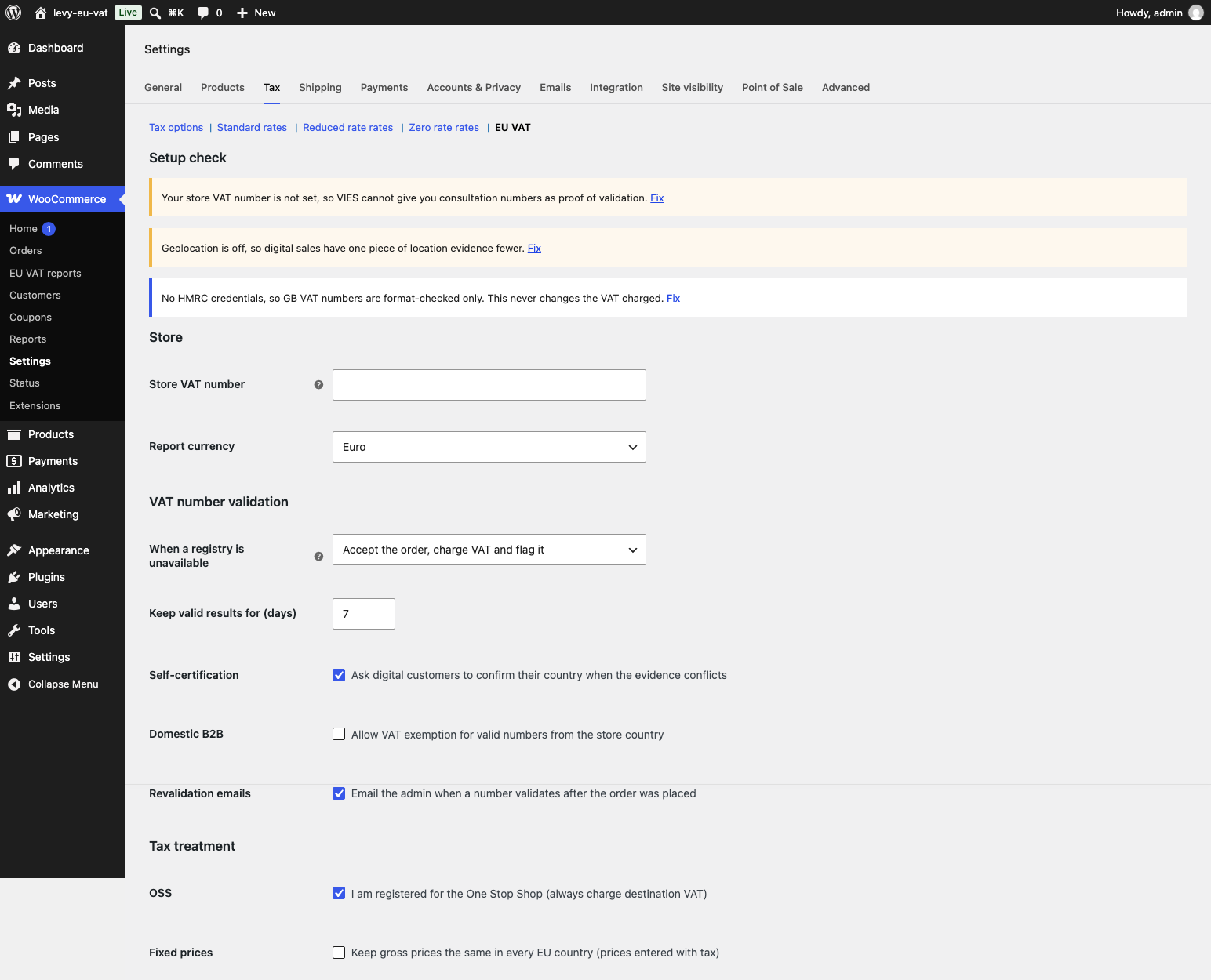
Settings live under WooCommerce > Settings > Tax > VAT Right.
What it does
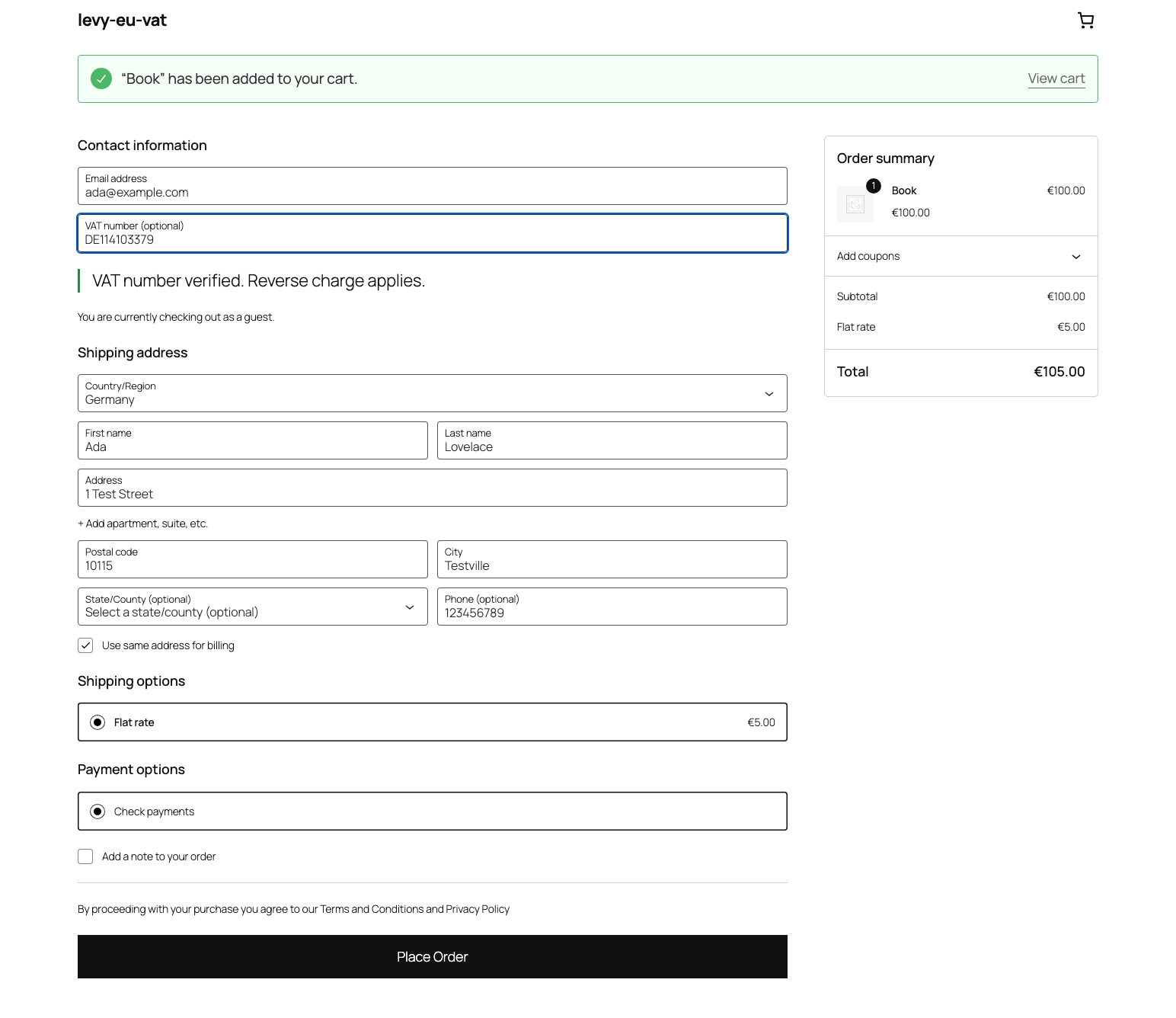
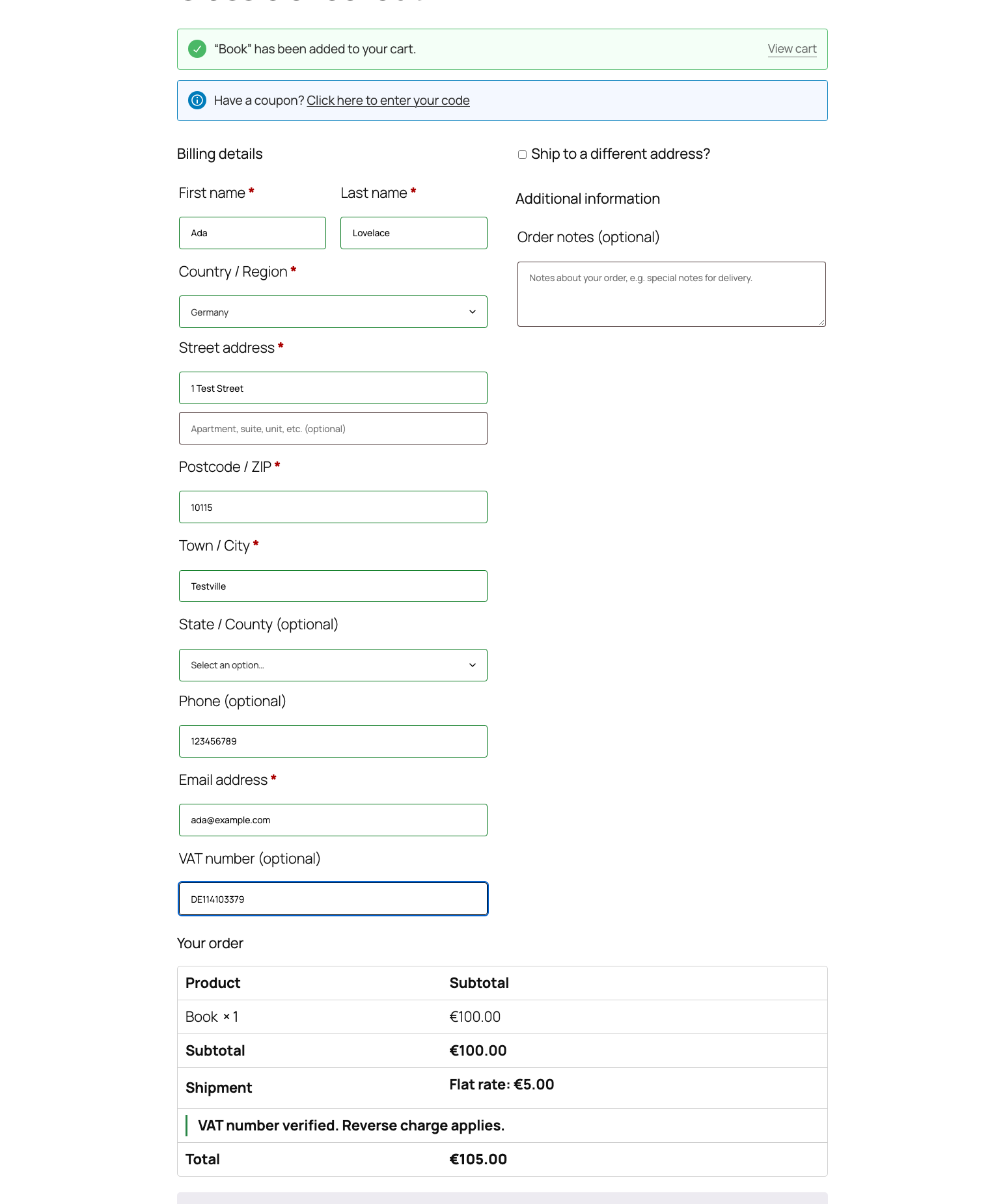
- Adds a VAT number field to the block checkout, the classic checkout, My Account and the admin order screen. Numbers are checked for format first, then against the official registry.
- Registries: VIES for EU numbers, HMRC for GB numbers (needs your own free HMRC developer credentials, see the FAQ), the Swiss UID register for CHE numbers and the Brønnøysund register for Norwegian numbers.
- Applies reverse charge to B2B sales with a valid number, with the wording required on the order, emails and invoice text (filterable and translatable). A valid number from your own country never exempts unless you switch that on.
- Charges B2C customers your country’s VAT below the EUR 10,000 OSS threshold and the destination country’s VAT above it, switching automatically. You can also tell the plugin you’re OSS-registered to always charge destination VAT.
- Digital products use location evidence (billing country, shipping country and geolocation). When the evidence conflicts, the customer can be asked to confirm their country.
- Imports standard and reduced rates from the EU’s TEDB into your WooCommerce tax classes. It shows a diff first and never changes a rate until you apply it. A tax class mapping screen sets which EU rate each class follows, per country.
- Optional fixed gross prices across EU countries for stores that enter prices with tax.
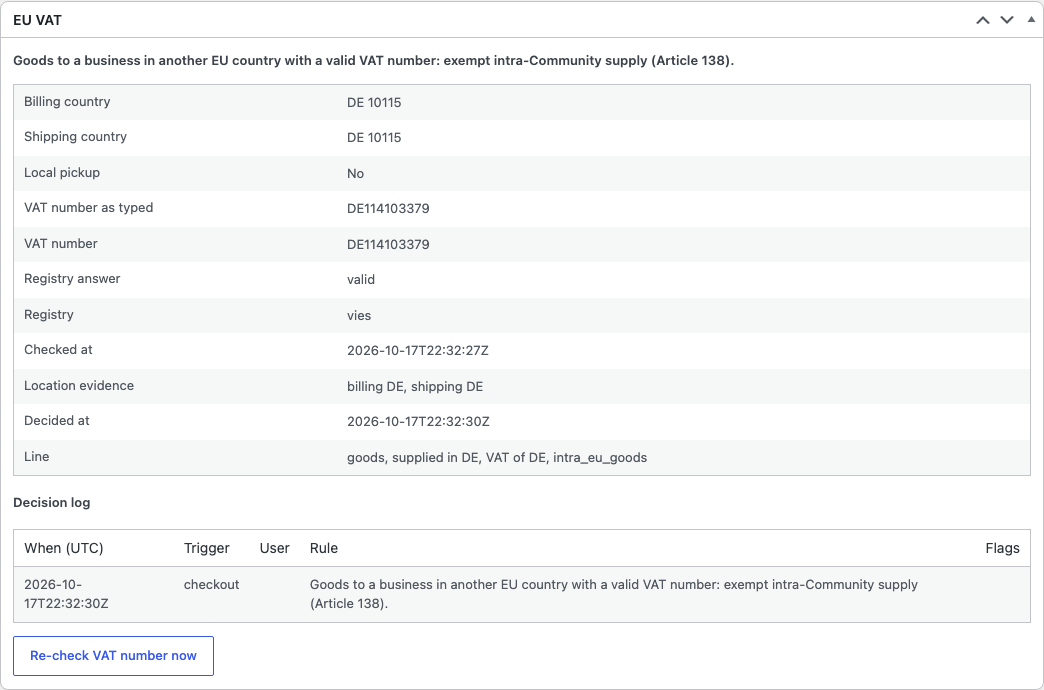
- Records the decision on every order: the number, the registry answer, the VIES consultation number when you’ve entered your own VAT number, the location evidence and the rule that applied. An EU VAT box on the order screen shows it, with a decision log and a button to re-check the number.
- Re-checks numbers that couldn’t be validated at checkout and can email you when one validates after the order was placed.
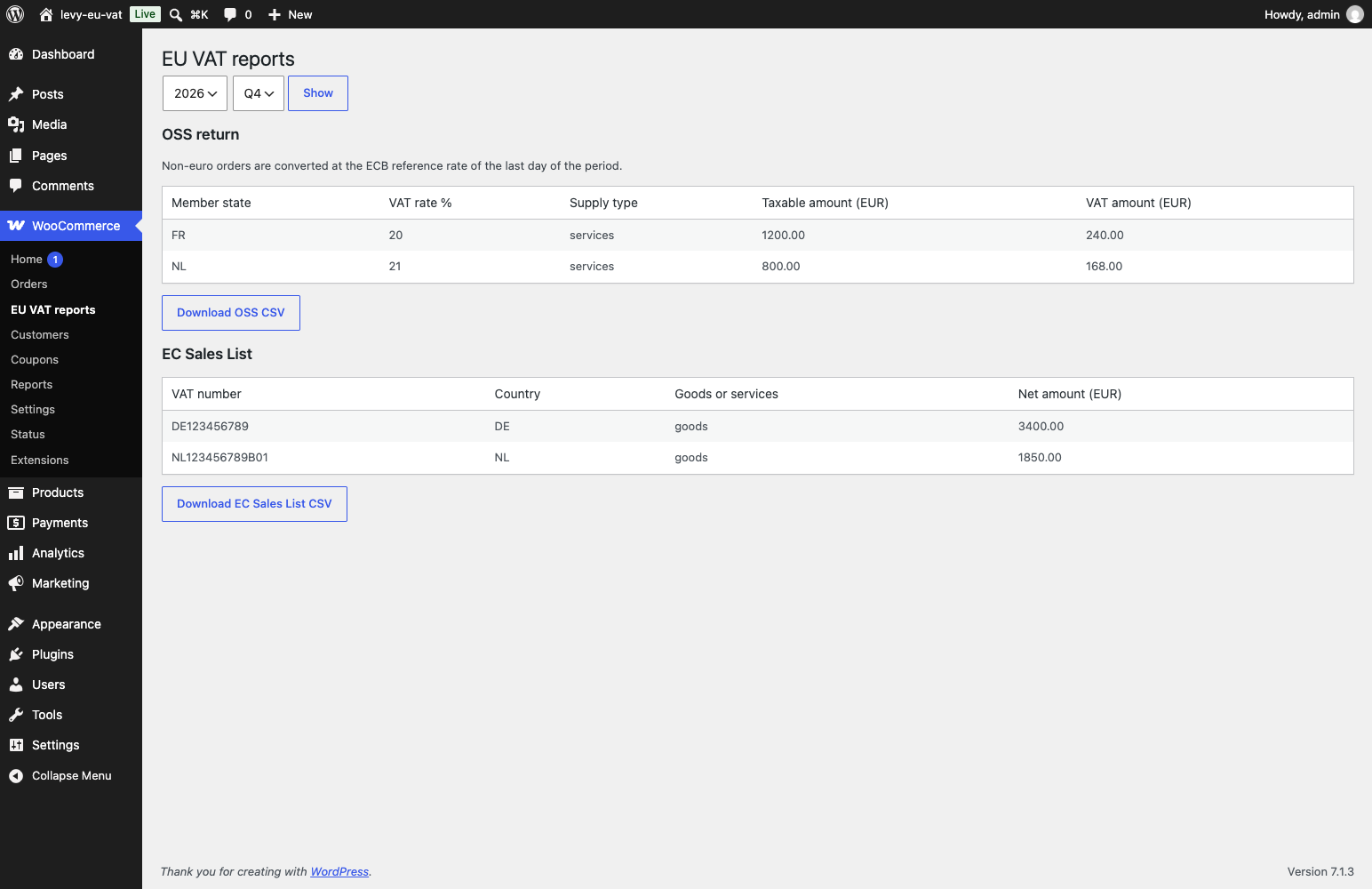
- Quarterly OSS return and EC Sales List reports with CSV export, in EUR. Orders in other currencies are converted at the ECB reference rate.
- REST endpoints for both reports and for the VAT data of a single order, restricted by capability.
- A setup check lists what’s missing: your VAT number, tax rates for destination countries, geolocation and HMRC credentials.
- Works with HPOS and with the block and classic checkouts. Integrates with WooCommerce Subscriptions renewal hooks, see the FAQ.
- Registers WordPress personal data exporters and erasers, and a retention setting for the stored data.
External services
The plugin contacts the services below. It never sends them an order’s contents, amounts or the customer’s name.
VIES (European Commission). Checks EU VAT numbers. Sent when a customer enters a number: the VAT number and, if you’ve set one, your store VAT number as requester. Used on the checkout, My Account, the admin order screen and in scheduled re-checks. VIES, legal notice, privacy policy.
HMRC VAT API (UK). Checks GB VAT numbers, only when you’ve entered HMRC credentials. Sent: the VAT number, your HMRC client ID and secret to obtain a token, and your GB VAT number if you’ve set one. Terms of use, privacy notice.
Swiss UID register (Swiss Federal Statistical Office). Checks CHE numbers. Sent: the number. UID register, terms.
Brønnøysund Register Centre (Norway). Checks Norwegian organisation numbers. Sent: the number. Terms of use, privacy statement.
EU Taxes in Europe Database, TEDB (European Commission). Source of the standard and reduced VAT rates. Sent when you fetch rates or the scheduled check runs: a rate query with no customer data. TEDB, legal notice, privacy policy.
European Central Bank. Source of the euro reference rates used to convert orders in other currencies for the reports. Sent: a currency code and date. Disclaimer, privacy.
Disclaimer
VAT Right is a tool, not tax advice. You, the store owner, are responsible for your VAT treatment and your filings. VAT rates and registry results come from third parties and can be wrong or out of date, so check them with an accountant. The plugin is provided without warranty and without liability, under the GPL.
Screenshots
Installation
- Make sure WooCommerce is active, then install and activate VAT Right.
- Go to WooCommerce > Settings > General and tick “Enable tax rates and calculations”. WooCommerce hides the Tax tab until you do.
- Go to WooCommerce > Settings > Tax > VAT Right and read the setup check.
- Enter your store VAT number so VIES can return a consultation number for each check.
- Apply the EU rates in the rates table at the bottom of the screen, or map your tax classes first.
FAQ
-
What happens when VIES is down?
-
Checkout still works. By default the order is accepted, VAT is charged and the order is flagged as pending validation. The plugin checks the number again later and, if it validates, marks the order and can email you so you can refund the VAT. The setting “When a registry is unavailable” offers two alternatives: accept the order, exempt the VAT and re-check later, or don’t accept the order. Registry requests time out after a few seconds.
-
How do I validate UK VAT numbers?
-
HMRC only answers requests that carry credentials from a registered application, so you need your own. They’re free.
- Create an account at the HMRC Developer Hub.
- Register an application and subscribe it to the VAT Registered Companies API (check a UK VAT number).
- Copy the client ID and client secret from the application.
- Paste them into WooCommerce > Settings > Tax > VAT Right > HMRC.
Without credentials, GB numbers are only format-checked and a business customer in the UK is treated as a consumer.
-
Does it work with WooCommerce Subscriptions?
-
The plugin hooks into the WooCommerce Subscriptions renewal and switch hooks. A renewal is decided as a new sale: the subscription’s stored registry answer is reused while it’s fresh, otherwise the number is checked again, and the decision is stored on the renewal order. If a renewal can’t be decided, VAT is charged. This has been tested against a stand-in for the Subscriptions hooks, not against the WooCommerce Subscriptions plugin itself.
-
What personal data does the plugin store, and for how long?
-
It stores the customer’s VAT number, the registry’s name, address and consultation number for it, and the IP country evidence used for digital sales, on the order, in the plugin’s ledger table and, for logged-in customers, in their account. After the retention period (10 years by default, counted from the end of the year of the sale, which matches the OSS record-keeping period) the plugin removes the personal data from the decision record and ledger rows and keeps the scheme, rule, amounts and country evidence. Exporters and erasers are registered with the WordPress privacy tools. All plugin data is kept when you delete the plugin, unless you tick “Delete all plugin data when the plugin is deleted”.
-
Which services does the plugin call?
-
See “External services” below. Nothing else is contacted, and the plugin makes no request unless a VAT number, a rate update or a currency conversion needs it.
-
Are there known limitations?
-
Each of these errs on the side of charging VAT.
- Consulting, legal, advertising and similar services to consumers outside the EU (Article 59 of the VAT Directive) are charged your store’s VAT.
- Business customers in the UK are treated as consumers unless you add your own HMRC API credentials. Swiss and Norwegian numbers that can’t be checked at checkout are charged VAT until they’re re-checked.
- In a cart that’s partly exempt because of a domestic exemption, the exempt line is charged VAT.
- On carts in a currency other than EUR, the threshold display updates at checkout, not on every cart recalculation.
समीक्षा
There are no reviews for this plugin.
Contributors & Developers
“VAT Right – EU VAT & OSS for WooCommerce” is open source software. The following people have contributed to this plugin.
Contributors
Translate “VAT Right – EU VAT & OSS for WooCommerce” into your language.
Interested in development?
Browse the code, check out the SVN repository, or subscribe to the development log by RSS.
Changelog
0.1.1
- First release.